
By Rodolfo M. Raya (rmraya@maxprograms.com)
Chief Technical Officer, Maxprograms
August 3, 2018 - Originally published on LinkedIn

By Rodolfo M. Raya (rmraya@maxprograms.com)
Chief Technical Officer, Maxprograms
August 3, 2018 - Originally published on LinkedIn
DITA (Darwin Information Typing Architecture) is an XML-based open standard for authoring content that can be published in multiple formats. DITA publishing is usually associated with the DITA Open Toolkit (DITA-OT). It is undoubtedly the most used tool to generate output from DITA file sets, but it is not the only option available.
Years ago, when I started writing manuals using DITA, I didn't like the styling of PDFs produced by the DITA-OT. Changing the look of a PDF was, and still is, a complex task. I wanted something that would generate nice looking PDFs from my DITA sources and started looking for an alternative tool.
Looking on the Internet, I found XMLMind DITA Converter (ditac), an open source DITA processor that, according to its web site, can transform DITA files to production-quality XHTML 1.0, XHTML 1.1, HTML 4.01, XHTML 5, Web Help, Java™ Help, HTML Help, Eclipse Help, EPUB 2, EPUB 3, PDF, PostScript®, RTF (can be opened in Word 2000+), WordprocessingML (can be opened in Word 2003+), Office Open XML (.docx, can be opened in Word 2007+), OpenDocument (.odt, can be opened in OpenOffice/LibreOffice 2+).
My initial tests with ditac produced PDF files that looked better without any customization. It was really a good start. Don't ask me why, but I left it aside and continued generating PDF files using the DITA-OT version included in <oXygen/> XML editor for a very long time.
As the DITA-OT evolved, <oXygen /> always made it easy to generate my manuals. But I wasn't very happy, although I was generating PDF using XEP to obtain a slightly nicer output. There was a noticeable difference with output from the free Apache FOP included in <oXygen/> and a PDF generated with XEP, but still not good enough.
Two years ago, I grabbed a fresh copy of ditac and tried again. Then I realized what was missing: an easy way to use it. I didn't want to use it from the command line, I needed a GUI for ditac and wrote one: Conversa DITA Publisher.
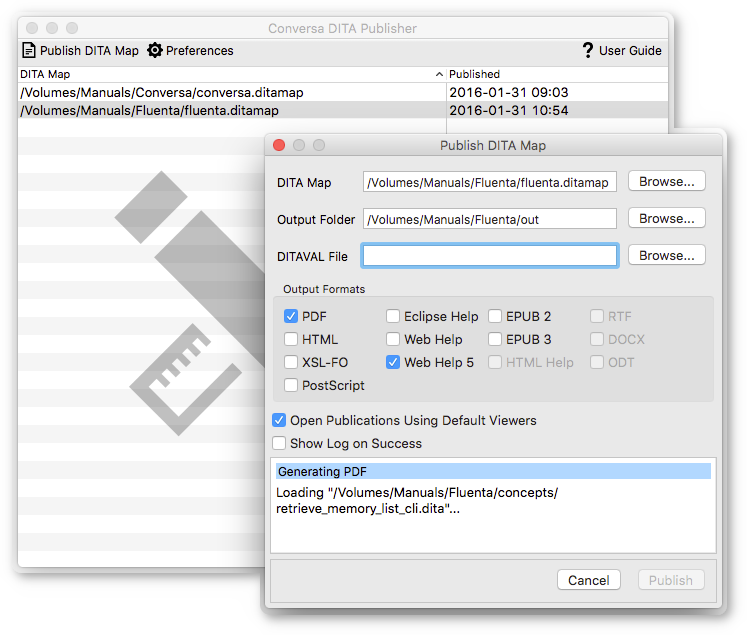
Conversa is an open source tool that uses ditac to generate PDF, HTML, Web Help, ePub 2 & 3 and more output formats.
Like with the DITA-OT, you can also customize the output of ditac. There are many parameters that you can pass to ditac XSL stylesheets, but with Conversa you can set those parameters directly in a graphical interface.
I like the output generated by ditac right out of the box. The only change I make when generating PDF is to include an outline, something disabled by default in ditac. I also change the default JQuery theme for Web Help from 'smoothness' to 'Redmond'. You can take a look at Conversa's Web Help.

Rodolfo M. Raya is involved in the development of localization standards including XLIFF, TMX, TBX, SRX, and GlossML.
He develops tools and libraries that implement these specifications, including the software and validation services available on this site.